Book an Appointment
Call Plantation Computer Repair Service at 754-241-1655
                   

(754) 241-1655

*


Plantation Computer Repair Service has provided the best mobile computer repair in Plantation, FL and the greater Miami Metropolitan Area since 1999. The term "mobile computer repair" means we come to you to resolve all your computer problems.

We repair laptops, desktops, PCs and Apple computers. One of our highly qualified staff will come to you, often the same day, to take care of all your repair needs.

Why not use the #1 rated company for computer repair in Plantation, FL?

Computer Repair 4.9 / 5 stars from 324 reviews
Why use a computer tech when you can have a Plantation based Computer Engineer? Mon-Sun 8:00am - 8:00pm

Call us at (754) 241-1655

Text us at (754) 241-1655

Email us your questions

Book an Appointment

"Great service and friendly staff. Got my computer fixed same day, thank you!"
Plantation Computer Repair Service 5 / 5 stars
"Dustin, the technician, did an awesome job. He kept me informed along the job. Techs like Dustin, make me a customer for life. "
Plantation Computer Repair Service 5 / 5 stars
"Wonderful service, from the initial phone call and scheduling, very upfront on costs. The tech showed up on time, with a 15 min courtesy call, he was professional, knowledgeable and gave great advice. He replaced my hard drive and got me back up and running. I would recommend this service. I chose it because of all the positive online reviews and I was not disappointed."
Plantation Computer Repair Service 5 / 5 stars
"Josh was again superb. He reinstalled my HP printer software and now I can scan once again. Much thanks for your service."
Plantation Computer Repair Service 5 / 5 stars
"Fast service! Fixed all of my computer problems and was very helpful in making suggestions on products I needed. He arrived on time and was professional. Overall a very pleasant experience and I will call again!"
Plantation Computer Repair Service 5 / 5 stars

Who is Plantation Computer Repair Service?

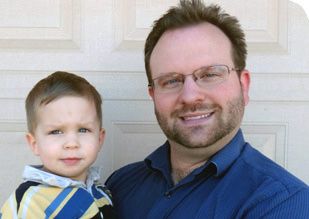
Plantation Computer Repair Service is owned by Matt Karls, an Electrical Engineer and a Computer Systems Engineer. We are a team of computer professionals focused on Service and quality, all our work is guaranteed.

If you have any computer, technology or IT problem in Plantation, FL we can fix it. We have been performing computer repair in Plantation full time since 1999. Feel free to give us a call or text us at (754) 241-1655.

Plantation Computer Repair Service's Computer Engineer

What is your Service Area for on-site Computer Repair?

Our primary on-site mobile service areas include the greater Miami Metropolitan Area as well as the Tampa, Orlando and Jacksonville metro areas.

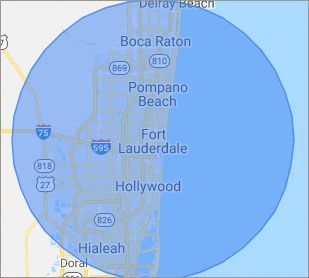
We provide remote and mobile computer repair in Plantation, Fort Lauderdale, Hialeah, Hollywood, Pembroke Pines, Miami, Miramar, Coral Springs, Miami Gardens, Pompano Beach, West Palm Beach, Davie, Boca Raton, Sunrise, Miami Beach, Deerfield Beach, Boynton Beach, Weston and Coral Gables.

Our on-site Computer Service Area

What should someone expect that hires you for Computer Service?

Our mission is to fully resolve your computer problems quickly and affordably. If you want a Computer Engineer that can fix all of your computer problems instead of a computer tech, a computer geek, a technician or a computer guy that can only fix some of your problems; call us at (754) 241-1655.  

What types of Computer Services do you perform?

We service businesses and business clients in their homes, including:
 
  • Diagnose / repair hardware or software problems
  • Spyware, malware, trojan and virus removal
  • Setup wireless and small business networks
  • Laptop repair, PC repair and Apple repair
  • Hard drive data recovery

Plantation Computer Repair Service Contact Information

Plantation Computer Repair Service
Plantation, FL 33317
(754) 241-1655

Plantation Computer Repair Service is a Karls Technology company

* *
*
*
*
  *
* *


*
*
* * * * * * * * * * * * * * *
4.9 / 5 stars from 324 reviews

"Great service and easy to work with!!!"

Plantation Computer Repair Service 5 / 5 stars

"Anthony was very helpful in each step of the process, very professional."

Plantation Computer Repair Service 5 / 5 stars

"My tech was great and appeared knowledgeable, I won't hesitate to contact again and I would highly recommend."

Plantation Computer Repair Service 5 / 5 stars

"Taylor worked through 6 PC systems with great ease. Very satisfied with his skills and his help servicing our systems."

Plantation Computer Repair Service 5 / 5 stars
Best Antivirus Software of 2026: The Ultimate Guide to Cybersecurity Brands

In 2026, the digital threat landscape has shifted. We are no longer just fighting simple viruses; we are defending against AI-generated phishing, sophisticated ransomware-as-a-service, and complex identity theft. Choosing the right antivirus brand is no longer optional—it is the foundation of your digital life. At Karls Technology, we’ve analyzed the top-performing security suites of the […] The post Best Antivirus Software of 2026: The Ultimate Guide to Cybersecurity Brands appeared first on Computer Repair Blog.

Browser Extensions – Safe or Not?

When little software programs called browser extensions are installed on a web browser, it can be enhanced with new features and functions. Those who work online benefit greatly from these extensions. Similar to how JavaScript may utilize a web page’s APIs (Application Program Interface), a browser extension can do the same.These are also called “plug-ins”. […] The post Browser Extensions – Safe or Not? appeared first on Computer Repair Blog.

Upcoming VPN Feature on Windows 11

As of Windows 11, a message may soon appear in the system tray when you are connected to a VPN, allowing you to confirm that you are connected if you prefer anonymous browsing. Virtual Private Networks (VPNs) make it possible to surf the Internet without being traced. Unfortunately for companies, this location-insensitive technology is useless […] The post Upcoming VPN Feature on Windows 11 appeared first on Computer Repair Blog.

Downgrading Back to Windows 10

There are many new and improved features in Windows 11, and the OS may also be customized to your liking in terms of its look and feel. If you install Windows 11 and find that you don’t like it, you may always revert to a previous version. You can use this function for free for […] The post Downgrading Back to Windows 10 appeared first on Computer Repair Blog.

Lockdown Mode Now Available

Lockdown Mode is a new security option available to iPhone and iPad owners in iOS 16 and iPadOS 16. Its purpose is to safeguard users from attacks launched by privately-held firms developing government-sponsored spyware. In July, when it was still in beta, we let our readers know about it. You can now obtain it. Users […] The post Lockdown Mode Now Available appeared first on Computer Repair Blog.

What is System Restore?

System Restore is a useful Windows feature that allows you to restore any changes made to your computer’s settings to a previous save point. As a result, if a computer has system-related issues, the System Restore feature will use the restore point to revert to those settings from the current one. To use this feature, […] The post What is System Restore? appeared first on Computer Repair Blog.

If You Don’t Have Newest Windows 11 Update

Your PC may not be compatible with the latest version, or you may not have met the system requirements, thus you haven’t gotten the update notification yet. It’s more probable that you’ll run into issues after upgrading to Windows 11 through Windows Update if you haven’t been warned against doing so. The rollout of the […] The post If You Don’t Have Newest Windows 11 Update appeared first on Computer Repair Blog.

New Microsoft Defender SmartScreen Feature

In an effort to ward off phishing attacks and encourage users to use strong passwords, Microsoft released Defender SmartScreen. The Windows 11 22H2 update, which Microsoft issued at the end of the previous month, included a new feature that should make it easier for users to keep their credentials secure. When logging into an app […] The post New Microsoft Defender SmartScreen Feature appeared first on Computer Repair Blog.

Force Quit Apps Using End Task

The End Task button in the Windows Task Manager terminates any open or background application. If an application is unresponsive or frozen, the user can force it to close by using the End Task command rather than having to restart Windows. The Windows Task Manager can be accessed by using Ctrl+Shift+Esc. Select the application you’d […] The post Force Quit Apps Using End Task appeared first on Computer Repair Blog.

Windows OS is Unresponsive – Fast Startup

Turning off this feature could be the quickest and easiest approach to solve this problem. The useful function known as “Fast Startup” maintains your Windows OS in the hibernation mode so that it does not need to be completely relaunched after it has been shut down. This results in a significantly quicker reboot. Even though […] The post Windows OS is Unresponsive – Fast Startup appeared first on Computer Repair Blog.