Book an Appointment
Call Plantation Computer Repair Service at 754-241-1655
                   

(754) 241-1655

*


Plantation Computer Repair Service has provided the best mobile computer repair in Plantation, FL and the greater Miami Metropolitan Area since 1999. The term "mobile computer repair" means we come to you to resolve all your computer problems.

We repair laptops, desktops, PCs and Apple computers. One of our highly qualified staff will come to you, often the same day, to take care of all your repair needs.

Why not use the #1 rated company for computer repair in Plantation, FL?

Computer Repair 4.9 / 5 stars from 324 reviews
Why use a computer tech when you can have a Plantation based Computer Engineer? Mon-Sun 8:00am - 8:00pm

Call us at (754) 241-1655

Text us at (754) 241-1655

Email us your questions

Book an Appointment

"Great service and friendly staff. Got my computer fixed same day, thank you!"
Plantation Computer Repair Service 5 / 5 stars
"Dustin, the technician, did an awesome job. He kept me informed along the job. Techs like Dustin, make me a customer for life. "
Plantation Computer Repair Service 5 / 5 stars
"Wonderful service, from the initial phone call and scheduling, very upfront on costs. The tech showed up on time, with a 15 min courtesy call, he was professional, knowledgeable and gave great advice. He replaced my hard drive and got me back up and running. I would recommend this service. I chose it because of all the positive online reviews and I was not disappointed."
Plantation Computer Repair Service 5 / 5 stars
"Josh was again superb. He reinstalled my HP printer software and now I can scan once again. Much thanks for your service."
Plantation Computer Repair Service 5 / 5 stars
"Fast service! Fixed all of my computer problems and was very helpful in making suggestions on products I needed. He arrived on time and was professional. Overall a very pleasant experience and I will call again!"
Plantation Computer Repair Service 5 / 5 stars

Who is Plantation Computer Repair Service?

Plantation Computer Repair Service is owned by Matt Karls, an Electrical Engineer and a Computer Systems Engineer. We are a team of computer professionals focused on Service and quality, all our work is guaranteed.

If you have any computer, technology or IT problem in Plantation, FL we can fix it. We have been performing computer repair in Plantation full time since 1999. Feel free to give us a call or text us at (754) 241-1655.

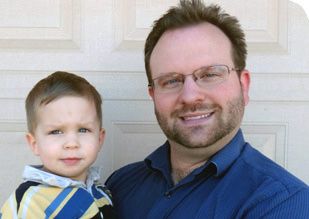
Plantation Computer Repair Service's Computer Engineer

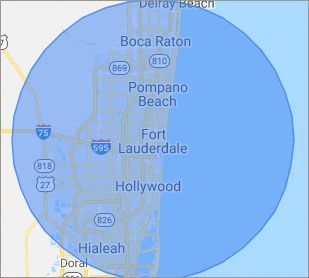
What is your Service Area for on-site Computer Repair?

Our primary on-site mobile service areas include the greater Miami Metropolitan Area as well as the Tampa, Orlando and Jacksonville metro areas.

We provide remote and mobile computer repair in Plantation, Fort Lauderdale, Hialeah, Hollywood, Pembroke Pines, Miami, Miramar, Coral Springs, Miami Gardens, Pompano Beach, West Palm Beach, Davie, Boca Raton, Sunrise, Miami Beach, Deerfield Beach, Boynton Beach, Weston and Coral Gables.

Our on-site Computer Service Area

What should someone expect that hires you for Computer Service?

Our mission is to fully resolve your computer problems quickly and affordably. If you want a Computer Engineer that can fix all of your computer problems instead of a computer tech, a computer geek, a technician or a computer guy that can only fix some of your problems; call us at (754) 241-1655.  

What types of Computer Services do you perform?

We service businesses and business clients in their homes, including:
 
  • Diagnose / repair hardware or software problems
  • Spyware, malware, trojan and virus removal
  • Setup wireless and small business networks
  • Laptop repair, PC repair and Apple repair
  • Hard drive data recovery

Plantation Computer Repair Service Contact Information

Plantation Computer Repair Service
Plantation, FL 33317
(754) 241-1655

Plantation Computer Repair Service is a Karls Technology company

* *
*
*
*
  *
* *


*
*
* * * * * * * * * * * * * * *
4.9 / 5 stars from 324 reviews

"Great service and easy to work with!!!"

Plantation Computer Repair Service 5 / 5 stars

"Anthony was very helpful in each step of the process, very professional."

Plantation Computer Repair Service 5 / 5 stars

"My tech was great and appeared knowledgeable, I won't hesitate to contact again and I would highly recommend."

Plantation Computer Repair Service 5 / 5 stars

"Taylor worked through 6 PC systems with great ease. Very satisfied with his skills and his help servicing our systems."

Plantation Computer Repair Service 5 / 5 stars
Best Antivirus Software of 2026: The Ultimate Guide to Cybersecurity Brands

In 2026, the digital threat landscape has shifted. We are no longer just fighting simple viruses; we are defending against AI-generated phishing, sophisticated ransomware-as-a-service, and complex identity theft. Choosing the right antivirus brand is no longer optional—it is the foundation of your digital life. At Karls Technology, we’ve analyzed the top-performing security suites of the […] The post Best Antivirus Software of 2026: The Ultimate Guide to Cybersecurity Brands appeared first on Computer Repair Blog.

Disabling Game Mode on PC

By switching to “Game Mode,” your PC will be set up for maximum gaming performance. While this is fantastic during gameplay, it may cause your computer to run more slowly during other activities. You can improve your computer’s speed by disabling Game Mode. Even if you’ve never played a video game in your life, there’s […] The post Disabling Game Mode on PC appeared first on Computer Repair Blog.

New Feature for AirTags

Apple is currently working on an additional feature on Find My to allow AirTags to “chirp”. This is a small, but important accessory to their product. According to sources from 9to5Mac, AirTag and a few other third-party devices allow you to “ping” an accessory with a sound. With this revision, the same function will be […] The post New Feature for AirTags appeared first on Computer Repair Blog.

‘What is my IP address’ on Mac

Internet Protocol (IP) addresses are needed for computers including desktops, portable devices, and hosts to communicate with one another via the network. It is important to know where to find the IP address, if it’s needed for any future issues. If you’re needing to find your IP address on your Mac, look no further. There […] The post ‘What is my IP address’ on Mac appeared first on Computer Repair Blog.

Safari Browser – How to Delete History

When a Mac starts to operate slowly, cleaning the browser’s history is a common first step in getting it back up to speed. Here’s how to do just that: Open Safari For a complete log of your activity, select History from the menu bar. When the submenu appears, select Clear History from its lowest position. […] The post Safari Browser – How to Delete History appeared first on Computer Repair Blog.

How to Hide Documents on your PC

There are instances when we have sensitive files that we’d prefer to keep hidden from prying eyes. There is an uncomplicated method is effective and can be used in such a scenario. Here’s how to hide documents: Right-click on the document Go to Properties Click the Hidden option and hit apply If you ever have […] The post How to Hide Documents on your PC appeared first on Computer Repair Blog.

Solid-State Buttons on Upcoming iPhones? Maybe!

Next year, the volume and power buttons on the iPhone 15 Pro and Pro Max might be changed to solid-state buttons instead of being able to be pressed down. The Home button of the iPhone 7 was the first to be made entirely out of a solid-state component. This allows thumbprints to be the way […] The post Solid-State Buttons on Upcoming iPhones? Maybe! appeared first on Computer Repair Blog.

Apple Event in October

Apple is reportedly getting set to have an event in October. This time around, Apple is putting its attention squarely on its newest hardware and software releases: iPadOS 16 and macOS Ventura. 9to5Mac reports that Apple is working on including the MagSafe connector into the iPad Pro 11 (with an LCD panel) and the iPad […] The post Apple Event in October appeared first on Computer Repair Blog.

Closing Windows with Shortcut

Pressing the Windows key + D instantly minimizes all open windows. By doing it this manner, you can avoid manually closing each window. To restore any minimized windows to their original position, hit the Win and D keys simultaneously. The desktop can be accessed by hitting the Windows key and the letter M. Apps like […] The post Closing Windows with Shortcut appeared first on Computer Repair Blog.

Remote Desktop Not Working? Here May Be Why (KB5019980)

Microsoft acknowledged many problems with Windows 11 recently, including that the Remote Desktop software may not be working properly. What is Remote Desktop? After installing a program called “Remote Desktop,” it’s easy to establish connections with other computers. It’s a convenient way to transfer data or offer technical support from one computer to another. In […] The post Remote Desktop Not Working? Here May Be Why (KB5019980) appeared first on Computer Repair Blog.